Transactions
One row per expense or income: date, description, a category from the dropdown, and the amount in Money out or Money in. Room for 1,000 rows.
One row per expense, a category from a dropdown, and the Monthly sheet does the rest: spending by category against your budget, your income and your savings rate, month by month.
Built the way we would keep a budget by hand. Nothing to buy, nothing locked.
Prefer not to share your email? Download it directly: same file.
Using Google Sheets? Make your own copy in one click.
.xlsx · about 25 KB · no macros · Excel, Google Sheets, LibreOffice
Everything a monthly budget needs, and nothing you have to maintain.
One row per expense or income: date, description, a category from the dropdown, and the amount in Money out or Money in. Room for 1,000 rows.
12 spending and 2 income categories to start, each spending category with its monthly budget. Rename, add or delete freely.
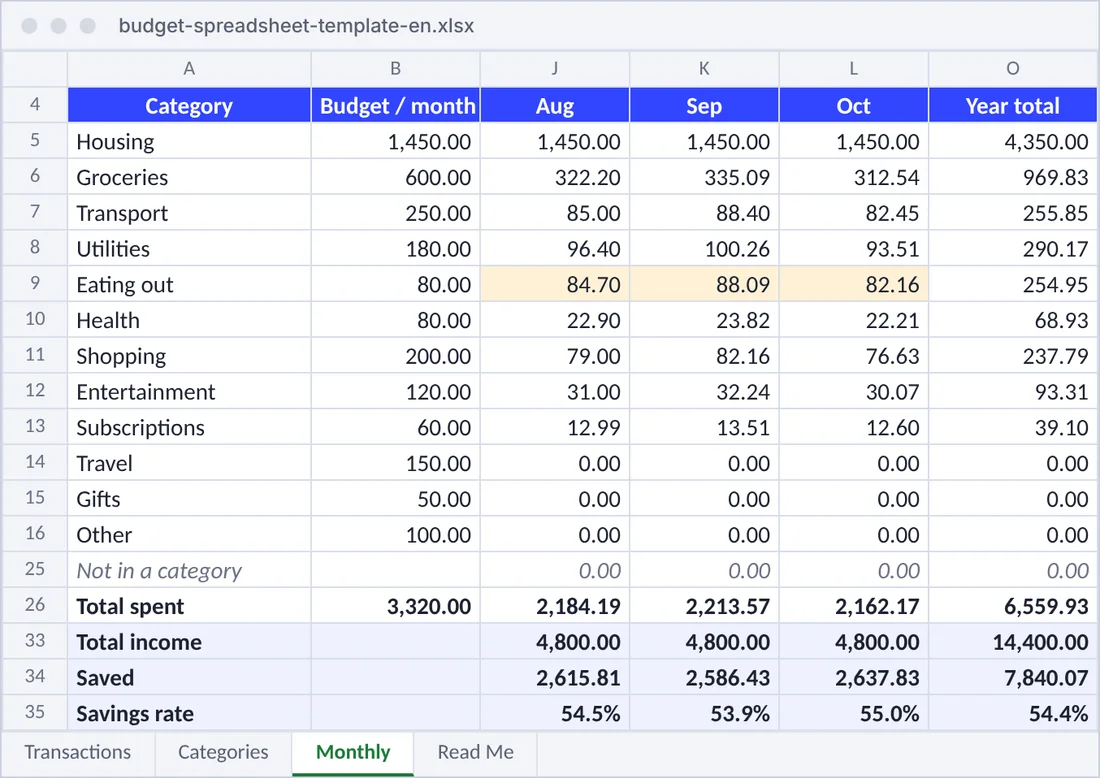
Every category per month and the year total, with the months over budget in amber. Change the year cell to see another year.
Total income, what you saved and your savings rate per month: the number that tells you whether you are getting ahead.
Income against spending, month by month, on the Monthly sheet.
The Transactions sheet is the first sheet of the file, laid out so the expense tracker reads it with no column mapping.
The routine that keeps a budget alive.
The file opens with three months of sample rows so you can see it work. Delete them and keep the headings.
One line per purchase, or once a week from your banking app. Amounts are always positive: spending in Money out, income in Money in.
Give each spending category a monthly budget on the Categories sheet. Months over it turn amber.
The Monthly sheet shows where the money went, what you saved and your savings rate.
What you save each month ends up in your net worth: follow it with the free net worth spreadsheet, and your investments trade by trade with the portfolio tracker spreadsheet.
The free expense tracker reads this file as it is: dates, descriptions, categories, spending and income. From then on you can import the CSV, Excel or PDF statement your bank lets you download instead of typing, in any currency, with no bank connection. Shops you filed before keep their category.
The template is complete on its own. These are the jobs a spreadsheet leaves to you.
| Budget spreadsheet | Expense tracker | |
|---|---|---|
| Adding expenses | Typed in, one row each | Typed in, or imported from your bank’s CSV, Excel or PDF statement |
| Categories | Picked from a dropdown | Learned from your past expenses when you import; AI sorts the rest on Premium |
| Several currencies | One currency per file | Each entry in its own currency, converted with daily rates |
| Budget vs actual | Per category and month, amber when over | Budgets and recurring entries on Premium |
| Savings rate | Per month | Per month, with the trend and what changed |
| Your net worth | Not included | Next to your investments, pensions and cash, in one account |
Yes. Download it, use it, share it and change it as you like. The email is optional: there is a direct download link under the form.
Yes. Upload the file to Google Drive and open it with Google Sheets, or create a sheet and use File, then Import, then Upload, and choose "Replace spreadsheet". Formulas, dropdowns and the chart come along.
Income goes in the Money in column with an income category such as Salary. The Monthly sheet adds it up, subtracts your spending and shows what you saved and your savings rate. Money you move to savings is not spending: leave it out, or give it its own category if you want to see it.
Yes. Rename, add or remove them on the Categories sheet; the dropdown and the Monthly sheet follow. Spending whose category is not on the list shows up under "Not in a category", so the totals always add up.
It does not impose a method: you set a budget per category. If you want a starting point, the free budget calculator on this site splits your income with the 50/30/20 rule, and you can copy its amounts into the Categories sheet.
Yes. The expense tracker on this site reads the Transactions sheet directly: create a free account, open the expense import and drop the file in. Dates, descriptions, categories, spending and income are recognised.
Download the template, delete the examples and log this week. When typing gets old, the expense tracker imports the whole file.
The amounts in the template and the screenshot are examples. Nothing here is financial advice.